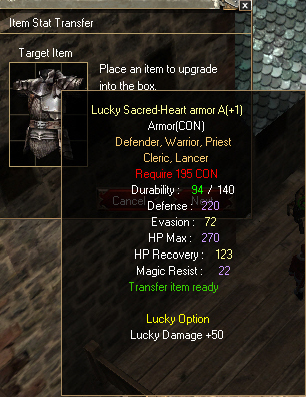
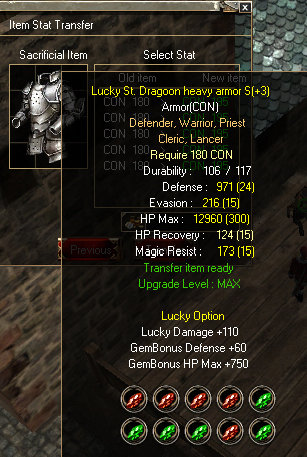
+ Item Transfer Guide +
Conditions
Items that can be transferred: Armor, Weapon, Shield, Ammo
* Weapon, Shield, and Ammo items must be the same item type only
For example, One-Handed Sword with One-Handed Sword, etc.
* Armor items can be transferred between any items with the same Status — DEX with DEX, and CON with CON
- item type (STR): One-Handed Sword, One-Handed Lancer, Combatant Sword
- item type (CON): One-Handed Axe, Combatant Blunt
- item type (INT): Scythe, Staff, Scepter
* Only usable with Grade A, AAA, and S items
* Cannot be used with Rental items
All values on the old item will be transferred completely, including every additional option
Transfer is possible at any item level, from +0 to +13
For example, if the old item is CON 180 capped at S grade, transferring it to a CON 195 item will no longer be capped at S — it becomes AAA
This is because the Status is higher, but every other value on the item stays identical to the old item
2 Transfer Scrolls are required

How to Use
Place the Transfer Scroll onto the item you want the stats moved to — the New Item
And onto the item whose options you're transferring away — the Old Item
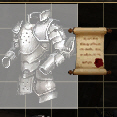
Once the Transfer Scroll is attached to the item, it will display Transfer item ready
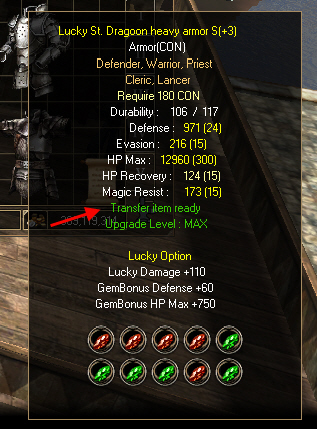
The Transfer Scroll is attached to both items — the item being transferred (CON 180) and the target item (CON 195)
At the Blacksmith NPC, select Item Assembly
Page 1 Insert the main item you want
|
Page 2 Insert your old item to transfer from |
|
|
* Tip: Check the cap value of the status being transferred. If it exceeds the S grade cap of the main item, the item will immediately be capped at S
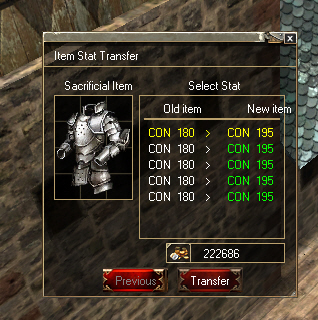
Verify that it is correct: CON 180 > CON 195 (transferring from CON 180 to CON 195)
Click either CON 180 or CON 195 to move the value, then click Transfer
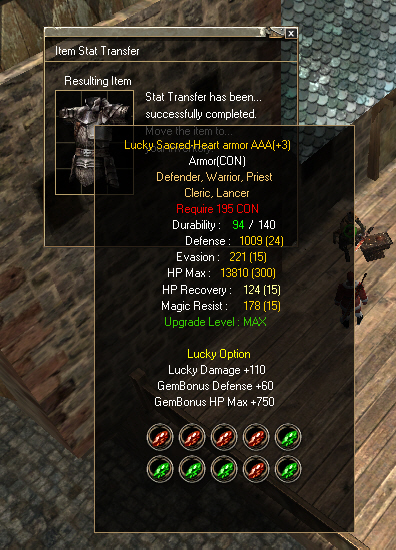
After a successful transfer
|
 Getting Ready